
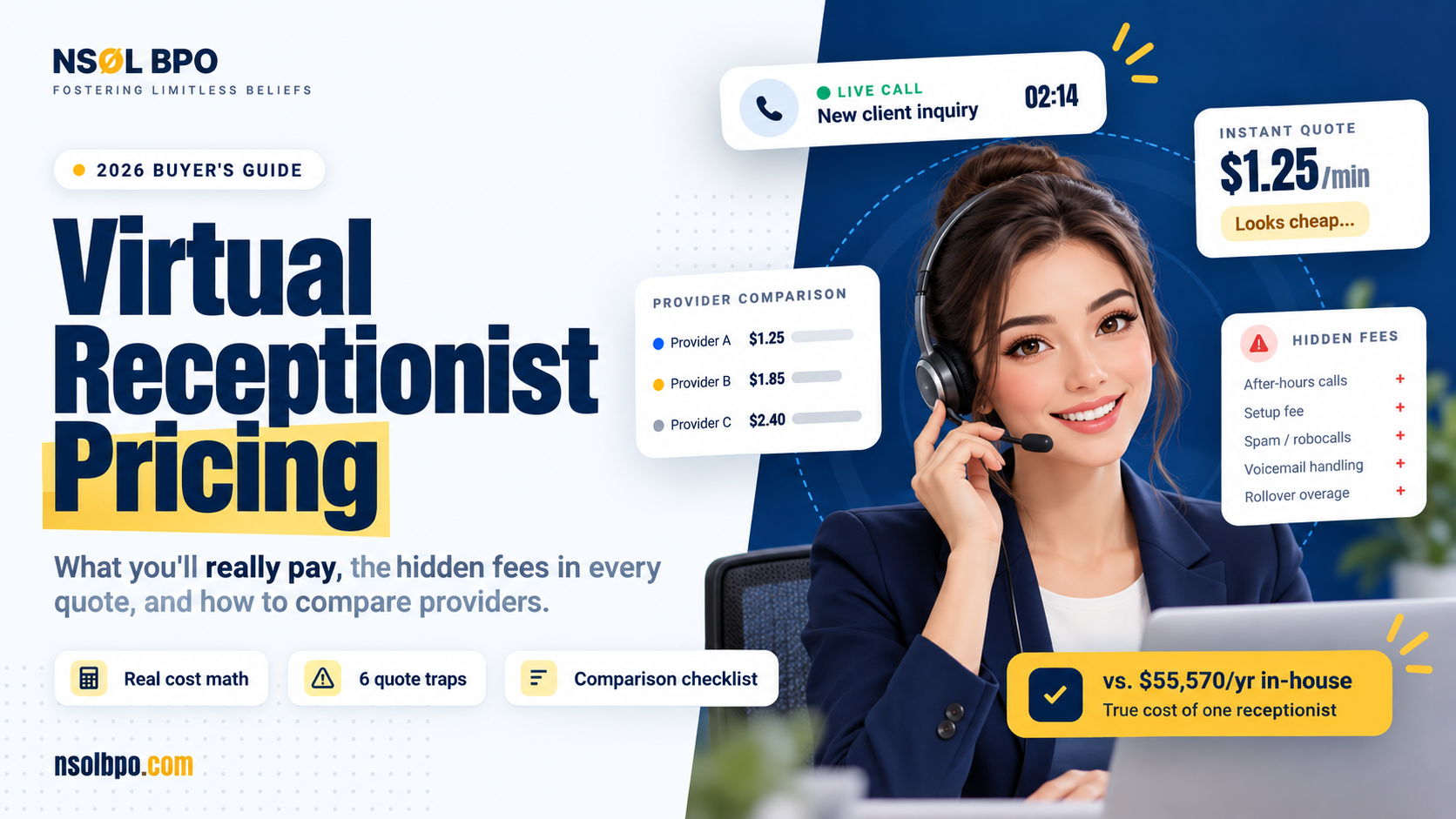
The quote says $1.25 a minute. Sounds reasonable. Then the first invoice shows up, and it’s nearly double what you budgeted, and nobody at the provider seems surprised.
This happens constantly, and it isn’t usually fraud. Virtual receptionist pricing is built on perfectly legal billing mechanics, clearly disclosed somewhere in the contract, and rarely explained on the sales call.
The rate you’re quoted is real. It just isn’t the full price.
Nobody ever tries to deceive you, but virtual receptionist pricing is far from simple, and the only things that complicate the pricing system are the things that never get mentioned.
We will show you here how pricing actually works, the price of having your own in-house front desk for comparison, and the six points where your quote starts losing resemblance to your invoice.
How Virtual Receptionist Pricing Actually Works
Virtual receptionist pricing comes in four shapes. Most providers use one, some blend two, and almost nobody explains which one suits you.
Per minute. You buy a block of talk minutes each month. Straightforward on paper, and the model where billing increments matter most, which we’ll get to.
Per call. A flat rate per answered call regardless of length. Predictable if your calls are short and uniform. Brutal if half of them are thirty-second wrong numbers.
Flat monthly. A fixed fee for an agreed volume. Easiest to budget. Also the one with the steepest overage penalties once you cross the line.
Dedicated receptionist. A named person assigned to your account for set hours. Priciest per hour, closest to having someone at a desk, and the only model where the person actually learns your business.
None of them is better than the others in the abstract. They’re better or worse for your call pattern. A clinic taking forty short appointment calls a day and a law firm taking six long intake calls need opposite structures.
Which is why comparing virtual receptionist pricing on headline rate alone tells you almost nothing. Two providers can quote the same number and bill you amounts that differ by half.
Virtual Receptionist Cost: What You’re Really Comparing Against
Before you judge any virtual receptionist pricing quote, you need the number it’s competing with. Most owners get this wrong, because they compare against a salary rather than against what an employee actually costs.
The Bureau of Labor Statistics puts the median pay for receptionists at $38,010 a year as of May 2025. That’s the figure that lands in most budget spreadsheets.
It’s not what the desk costs. Not close.
BLS tracks employment costs separately. As of June 2026, total employer compensation for civilian workers ran $49.46 per hour worked: $33.85 in wages and $15.61 in benefits. Benefits are about 31.6% of the total package. Apply that to a $38,010 salary and your in-house receptionist actually costs roughly $55,570 a year.
That’s before a desk, a phone system, or a single hour of training. It’s also before you’ve worked out who answers the phone while that person is at lunch.
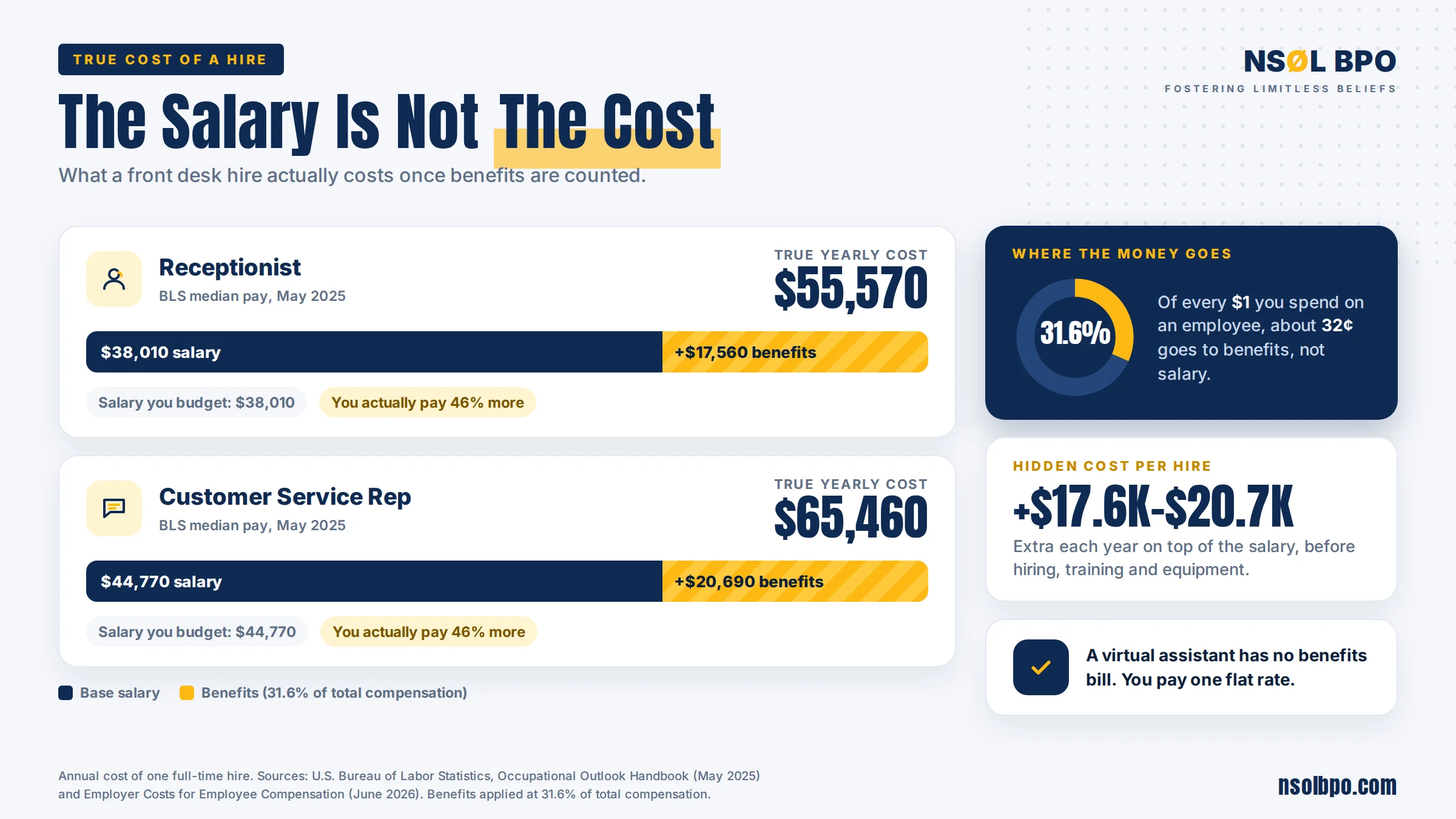
The salary you budget and the cost you pay are two different numbers.
Run the same math on a customer service representative, and it gets steeper. BLS puts that median at $44,770 a year, which loads up to roughly $65,460.
So when a provider hands you a monthly figure, the honest comparison isn’t $38,010. It’s $55,570 plus equipment, plus the weeks when that person is sick, on holiday, or at lunch while the phone rings.
The 6 Costly Traps in a Virtual Receptionist Quote
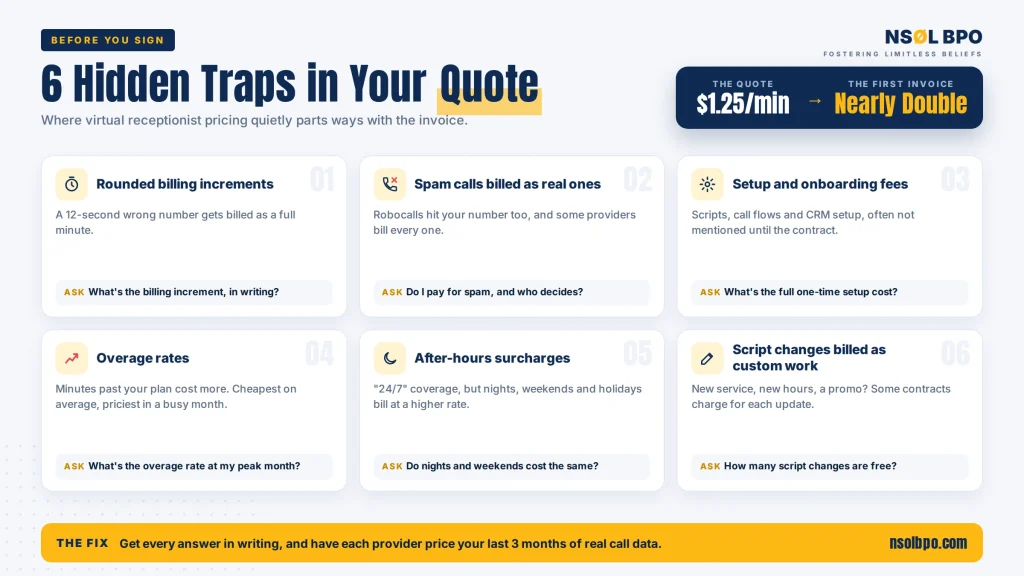
Here’s where virtual receptionist pricing quietly parts ways with the invoice. Ask about all six before you sign anything.
1. Rounded billing increments. Some providers bill in 30-second blocks. Others round every call up to a full minute, and a few round to the nearest 30 seconds above that. A 12-second “wrong number, sorry” becomes a full billed minute. On a hundred short calls a month, rounding alone can add a double-digit percentage to your bill. Ask for the increment in writing, not the rate.
2. Spam and wrong numbers billed as real calls. Robocalls reach your published line too. Some providers filter them for free; some bill every connected call the same way. Ask directly: do I pay for spam calls, and who decides what counts as spam?
3. Setup and onboarding fees. Script building, call-flow configuration, CRM integration. Often one-time, often not mentioned until the contract. That’s not unreasonable in itself, but it belongs in your first-year comparison, not as a surprise in month one.
4. Overage rates. This one’s the big trap on flat-monthly plans. Your included minutes are priced at one rate; everything past that is priced higher, sometimes much higher. A plan that looks cheapest at your average month can be the most expensive in your busiest. Ask for the overage rate and model it against your peak month, not your typical one.
5. After-hours, weekend, and holiday surcharges. If you need coverage outside business hours, confirm whether that time bills at the same rate. Plenty of providers advertise 24/7 availability and price nights differently from the headline rate.
6. Script changes billed as custom work. Your business changes constantly. You add a service, shift your hours, run a promotion. Some contracts include a set number of script revisions a year and bill the rest. Ask how many are free and what one costs.
None of these make a provider dishonest. They make virtual receptionist pricing incomplete. The fix is the same for all six: get the answer in writing before you sign, and ask the provider to price your last three months of actual call data rather than a hypothetical.
Why an Outsourced Receptionist Costs Less Than the Desk
The structural reason is simple: you stop paying for idle time. That’s the whole argument, and it’s why outsourced virtual receptionist pricing can undercut a payroll line that looks modest.
An in-house receptionist is paid for eight hours whether the phone rings forty times or four. An outsourced receptionist is paid for the minutes they actually work on your account, because the rest of their day belongs to someone else’s calls. You’re buying coverage, not attendance.
There’s a second reason, and it shows up in the national numbers. BLS projects that office and administrative support occupations will decline 4.0% between 2025 and 2035, shedding 752,100 jobs. That’s the fastest decline and the largest absolute loss of any major occupational group, against overall employment growth of 3.5%.
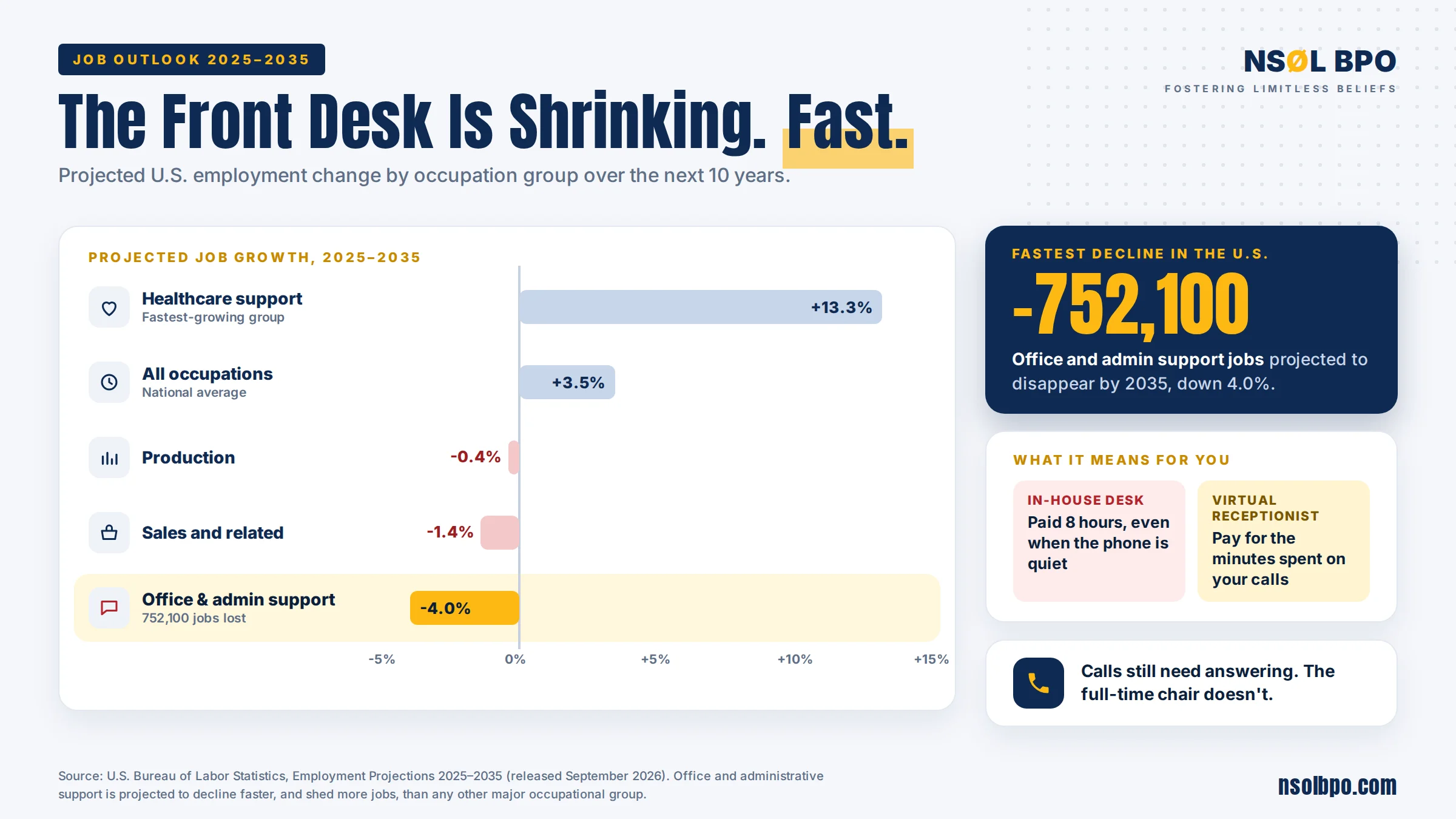
Office and administrative support is the fastest-shrinking major occupation group in the country.
Read that chart the right way. It doesn’t mean phone calls are going away. It means the full-time person sitting at a front desk waiting for them is, because the work gets absorbed into software and shared teams. Businesses still need calls answered. They’ve stopped needing a dedicated chair for it.
This matters most for the 6.37 million US small businesses that have employees at all. SBA’s 2025 Small Business Profile counts 36.2 million small businesses nationally, 99.9% of all US firms, but only a fraction of those carry payroll. For most of them, a full-time front desk was never going to happen. If you want the wider cost picture across roles, our virtual assistant cost guide breaks down the hourly ranges, and our comparison of a virtual assistant versus a full-time employee covers the staffing side of the same decision.
When a Bilingual Virtual Receptionist Is Worth the Premium
A bilingual virtual receptionist almost always costs more than a single-language one. Sometimes that premium is obvious value, sometimes it’s money you don’t need to spend, and virtual receptionist pricing rarely makes that difference clear on the quote itself.
It’s worth it when a real share of your inbound calls are in a second language, and those callers currently hang up. A caller who reaches someone who can’t help them doesn’t leave a message. They call your competitor. Quietly. You never see that loss in any report, which is exactly what makes it easy to ignore.
It’s not worth it when the need is occasional. If you get a handful of Spanish-language calls a month, a documented transfer path to one bilingual person on your own team costs nothing and works fine.
The way to decide is to look at your actual call log for a month rather than guessing, and to ask any provider quoting you a bilingual rate whether that rate applies to every call or only to the calls that need it. Those are very different bills.
Virtual Front Desk vs Answering Service
These two terms get used interchangeably on sales pages, and they shouldn’t be. The difference changes what you should expect to pay, and it’s the single biggest reason two virtual receptionist pricing quotes can look nothing alike.
An answering service takes a message. It’ll confirm who called, why, and a callback number, then passes it to you. The agent needs no knowledge of your business beyond your name and hours.
A virtual front desk does what the person at the desk did. Books appointments in your calendar, answers questions about your services, qualifies a lead, takes a payment, updates your CRM, routes the urgent call to the right person. That takes training on your systems, which is why it’s pricier and why onboarding takes longer.
Pay for a virtual front desk, and you should be getting outcomes, not messages. If your provider’s agents can’t touch your booking system, you’re paying front-desk rates for an answering service. We cover the broader role in our guide to the customer service virtual assistant, and the team-level version in customer experience outsourcing. If the phone sits alongside admin and data work, a BPO virtual assistant usually covers more ground for the same spend.
How to Compare Two Virtual Receptionist Pricing Quotes
Skip the feature lists. Virtual receptionist pricing only becomes comparable once every provider is quoting the same call data, so do this instead.
- Pull your last three months of call data: total calls, total talk minutes, average call length, how many came after hours.
- Send the same numbers to every provider and ask each one to quote your real volume, not a package tier.
- Ask all six trap questions above, by email, so the answers are in writing.
- Ask each one to price your busiest month, not your average month.
- Add setup fees into year one and divide by twelve before you compare monthly rates.
A provider who won’t quote against your real data is telling you something. One who comes back with a lower number once they’ve seen it is telling you something better.
That last step catches more overcharging than any amount of feature comparison. If you’re weighing providers more broadly, our rundown of the best virtual assistant companies applies the same test to the wider market.
Conclusion
Virtual receptionist pricing isn’t deliberately confusing, but it is easy to get wrong, and the mistakes all run in the same direction.
Two things fix most of it. Compare against the loaded cost of an employee, around $55,570 for a receptionist, not the $38,010 salary line. And make every provider quote your actual call data with the six trap questions answered in writing.
Do those two things, and the cheapest-looking quote and the cheapest quote usually turn out to be different ones. That gap is where most of the money in virtual receptionist pricing is won or lost.
NSOL BPO builds call coverage around your real volume and your own systems, with the billing terms stated up front. If you want someone to price your last three months honestly, get in touch, and we’ll run the numbers with you. Our wider business process services cover the rest of the back office if the phone is only part of the problem.
FAQ Block
What is the monthly cost of a virtual receptionist service?
This will be entirely dependent on the call volume and how you plan to bill it; it is for that reason that no provider can give you a straight answer without looking at your call volume statistics. For the purpose of comparison, let’s compare it to an in-house receptionist; the Bureau of Labor Statistics states the median salary to be $38,010. Adding the percentage of benefits, which is roughly 31.6%, to the total compensation, the desk ends up costing $55,570.
What is the most inexpensive virtual receptionist billing method?
There is no such thing as the cheapest model. Per-minute billing works well when dealing with fewer but long calls, per-call works best when dealing with many short uniform calls, and flat monthly is the most cost-effective way to bill steady and predictable call volumes.
Do I pay for spam calls and wrong numbers?
With some providers, yes. Robocalls reach your published number like any other call, and billing policies vary on whether a connected call counts. Ask before signing. Then ask who decides what counts as spam.
How does a virtual receptionist differ from an answering service?
An answering service delivers the message and then forwards it. The virtual receptionist, however, schedules appointments, addresses queries regarding services, qualifies the leads, and updates your systems. The latter is going to require some training for the software, cost more, and must deliver results instead of just sending back callback cards.
Would the bilingual virtual receptionist be worth the additional cost?
Yes, if a considerable amount of inbound calls is made in that language. Get a month’s record of call logs, instead of just guessing. In case the calls are rare, then it is perfectly acceptable to document the transfer to the bilingual colleague. You should also find out if the bilingual cost applies to all calls or only those that are needed.
Can an outsourced receptionist use my booking system and CRM?
A good one can, and should. If the agents can’t reach your calendar or CRM, you’re paying front-desk rates for message-taking. Confirm which systems a provider already integrates with before you compare their price to anyone else’s.